Add a guestbook to WordPress, Wix and more
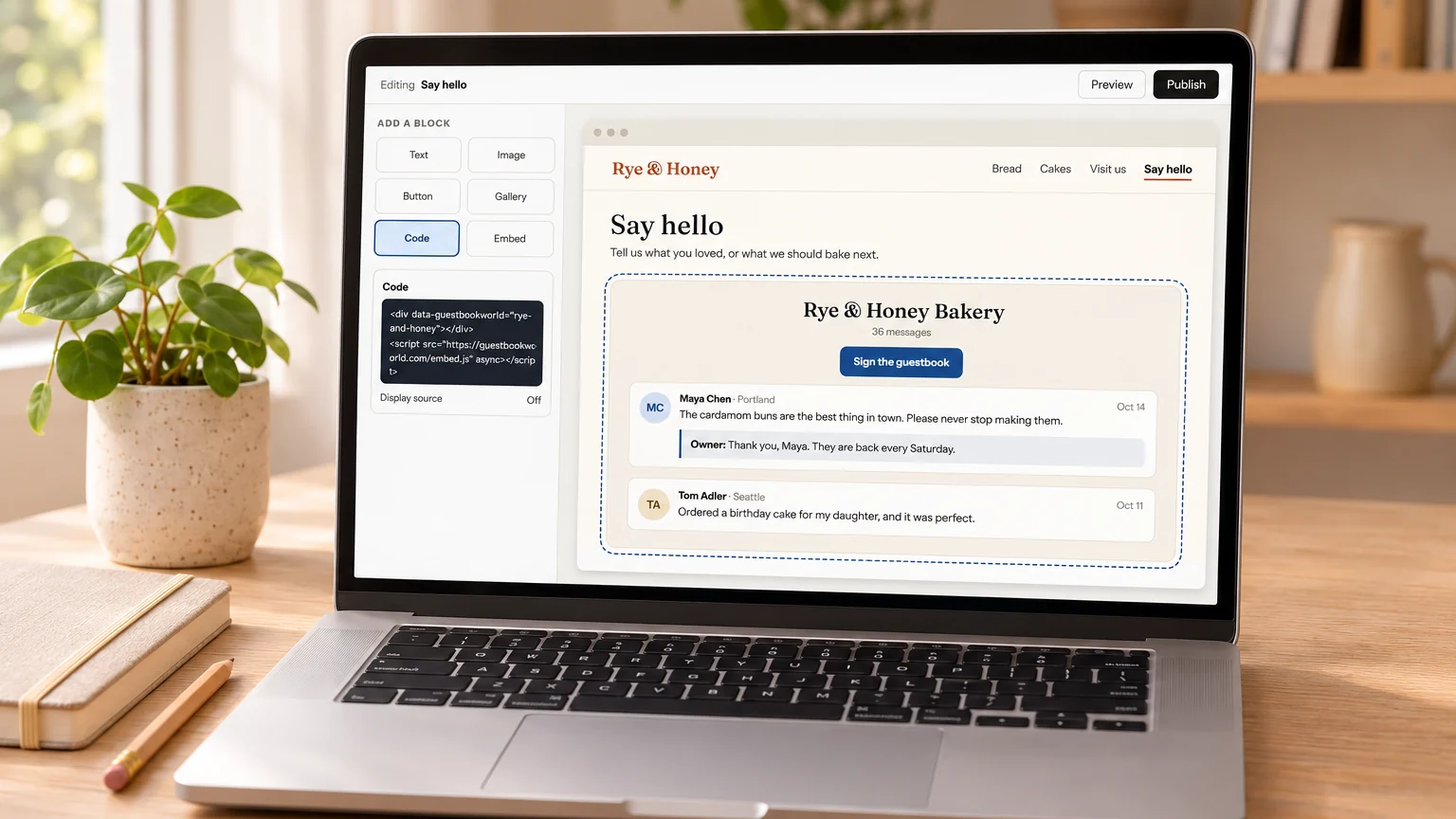
To add a guestbook to a site made with a website builder, you paste the guestbook’s code into the builder’s HTML or embed block. Every big builder has one, but each keeps it in a different menu. Some allow scripts only on paid plans, and some show your code in a box of fixed height. The steps and plan limits for six builders are below, taken from each builder’s own help pages on November 9, 2026.
The three kinds of code
Your guestbook’s Share page gives you three ways to show it on a site, so one of them fits every builder:
- The two lines. A small script loads the guestbook into your page, and the guestbook grows as messages come in. This needs a builder that runs scripts.
- The plain frame. One line of HTML that shows the guestbook in a frame of fixed height, 900 pixels to start, with its own scroll bar. Use it where scripts are not allowed or where the builder puts your code in a box of its own size.
- A link or the badge. The guestbook’s own page, or a small “Sign my guestbook” button that opens it. These work on every plan of every builder.
If you have no guestbook yet, make a free guestbook for your website first; its Share page has all three codes.
At a glance
| Builder | Where to paste | Which code | Plan needed for the code |
|---|---|---|---|
| WordPress.com | Custom HTML block | The two lines | A paid plan with hosting features on |
| WordPress you host yourself | Custom HTML block | The two lines | None, from an administrator account |
| Wix | Embed Code, then Embed a site | The guestbook’s frame address | None named in Wix’s help |
| Squarespace | Code block | The two lines | Core or higher |
| Google Sites | Insert, Embed, Embed code | The plain frame | None |
| Blogger | HTML/JavaScript gadget, or a page in HTML view | The two lines | None |
| Carrd | Embed element, type Code | The two lines | Pro Standard or higher |
WordPress
On WordPress.com, open the page, click the block inserter, search for “HTML” and add a Custom HTML block. Paste the two lines and update the page. The catch is the plan: WordPress.com’s help says tags such as script and iframe need “a paid plan with hosting features activated.” On a free plan, put the badge or a plain link in the same block instead, since links and images are not on that list.
On WordPress you install yourself, the same Custom HTML block works. According to the WordPress roles documentation, administrators and editors on a single site may post HTML and JavaScript, while on a Multisite network only Super Admins can. If the script vanishes when you save, your account lacks that permission: ask whoever runs the site, or paste the plain frame.
You can also skip outside services and install a guestbook plugin, such as Gwolle Guestbook, which keeps the messages in your own WordPress database. Then spam filtering and updates are yours to look after.
Wix
In the Wix Editor, click Add Elements, then Embed Code, then Popular Embeds, and pick Embed a site. Click Enter Website Address and paste your guestbook’s frame address, https://guestbookworld.com/embed/your-name/ with your own name in it. Click Apply.
Then drag the element until it is tall, about 900 pixels. Wix’s help says “The HTML and URL elements in our editor are iFrames,” and a frame keeps the size you give it, so the guestbook cannot stretch the element by itself. You can also pick Embed HTML instead and paste the plain frame code. Either way the address has to start with https, and ours does.
Squarespace
Open the page in edit mode, click Add block, choose Code and paste the two lines. Leave Display Source off, or the page shows the code as text instead of running it.
Squarespace’s help on code blocks says “To add JavaScript or an iframe to a code block, your site needs to be on the Core, Plus, or Advanced plan.” It also warns that code sometimes does not appear while you are logged in, even though visitors see it; use Preview in Safe Mode to check. On the Personal plan, add a button that links to the guestbook’s page, or paste the badge, which is plain HTML.
Google Sites
In the editor, open the Insert panel, choose Embed, then the Embed code tab, and paste the plain frame code. Click Next, then Insert. Drag the box until it is about as tall as the frame, 900 pixels.
The frame matters here. Google Sites runs pasted code inside a box of its own with scrolling switched off, so the two-line version keeps growing past the bottom of the box and the messages get cut off. The plain frame stays at its height and scrolls inside. We tested it on November 9, 2026, in a page that copies the frame settings of a live Google Site: the guestbook loaded, the spam check ran and a test message went through.
Blogger
Open Layout, click Add a Gadget in the section where the guestbook should go, choose HTML/JavaScript, give it a title and paste the two lines into the Content box. Save. Blogger puts gadget code straight into the page rather than into a frame, so the guestbook grows to fit, just as it does on a hand-written site.
A sidebar is narrow for a guestbook, though. For a full page, create a new page under Pages, switch the editor to HTML view, paste the two lines and publish.
Carrd
On Pro Standard or higher, click Add Element, then Embed. Set Type to Code, paste the two lines into Code, and set Style to Inline so the guestbook appears where the element sits. Carrd’s help notes that an embed shows nothing inside the builder, so publish the site to see it. On a lower plan, add a button that links to the guestbook’s page.
Any other builder
Look for a block with HTML or Embed in its name, sometimes called Code or Custom code. If it runs scripts and shows your code in the page itself, use the two lines. If it takes only frames, or shows your code in a box of fixed size, use the plain frame. If it takes neither, link to the guestbook’s page or add the badge. A hand-written site or Neocities takes the two lines anywhere in the HTML, as our Neocities guestbook guide shows.
Quick answers
Do I need a paid plan for a guestbook? Only for the code on WordPress.com and Squarespace, and for embeds on Carrd. A link to the guestbook and the badge work on every plan, and the guestbook itself is free.
Where are the messages kept? On Guestbook World, not in your builder. You moderate them and reply from your dashboard, and you can download all of them as a spreadsheet at any time. The rest is on our features page.
Should I use a guestbook or comments under each post? A guestbook is one box for the whole site. A blog that wants a thread under every post needs a comment system instead, as our guide to adding a comment box to your website explains.
Can each page have its own guestbook? Yes, for a few pages: one account holds up to ten guestbooks, and each has its own code.
Is it guestbook or guest book? On websites, one word is the usual spelling, as our guide to guestbook or guest book explains.